Patch Manager
“https://www.youtube.com/watch?v=PhIiVsCEBu8”
you are a aws expert. i have a fleet of 1000+ servers accross multiple aws accounts and some in azure. these are linux [most of them] - ubuntu [20,22,24 lts] and amazon linux plus a few windows servers 2016,2022. I want a automated and centralized way to patch them every week. some sensitive servers should not be patched without review. some jump and log servers can be patched and restarted automatically. I should get a report on which packages were updated were done on which server. explain the basic concepts of aws patch manager and give a clear explanation of baselines before you give me a very detailed solution based on my problem statement
Below is a from-first-principles → production-grade explanation, tuned for a 1000+ mixed fleet (AWS + Azure, Linux + Windows) with change control, auto-patch groups, and auditable reporting.
1️⃣ What is AWS Patch Manager (big picture)
AWS Systems Manager Patch Manager is a capability inside Systems Manager that lets you:
- Define what “approved patches” mean (security only, critical only, exclude kernels, etc.)
- Decide when and where patches are installed
- Automate patching on a schedule
- Control reboots
- Track compliance and generate reports
It does not:
- Replace your OS package manager (
apt,yum,dnf, Windows Update) - Randomly patch servers without rules
- Work only in AWS (hybrid is fully supported)
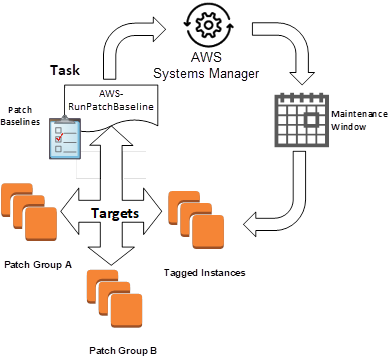
At scale, Patch Manager is really three things working together:
- Patch Baselines (policy)
- Maintenance Windows (time control)
- Patch Groups (targeting)
2️⃣ Core concept #1: Patch Baselines (this is the heart)
What is a Patch Baseline?
A Patch Baseline is a policy document that answers:
“Which patches are allowed to be installed on which OS?”
Think of it as iptables for OS updates.
It defines:
- Patch classification (Security, Critical, Bugfix, Enhancement)
- Patch severity (Critical, Important, Medium, Low)
- Auto-approval rules (e.g., auto-approve after 7 days)
- Explicit approvals / rejections
- Optional package name exclusions
- Whether to include non-security patches
📌 Nothing gets installed unless allowed by the baseline
Baseline example (Linux – conceptual)
| Rule | Meaning |
|---|---|
Approve Security + Critical | Only important patches |
| Auto-approve after 7 days | Safety soak period |
Reject kernel* | Prevent surprise reboots |
| Include CVE-addressing patches | Compliance requirement |
Windows baseline difference
Windows baselines work on:
- Microsoft Update categories (Security Updates, Critical Updates, Rollups)
- KB approval / rejection
- Auto-approval delays
Key mental model
Baselines = WHAT is allowed
Maintenance windows = WHEN it runs
Patch groups = WHERE it applies
3️⃣ Core concept #2: Patch Groups (how you separate servers)
Patch Groups are just EC2 / hybrid tags:
PatchGroup=prod-sensitive
PatchGroup=prod-auto
PatchGroup=jump-servers
Each Patch Group maps to exactly one Patch Baseline.
This is how you cleanly handle:
- Sensitive servers
- Auto-patch servers
- Different OS families
- Different reboot behavior
No scripts. No branching logic. Just tags.
4️⃣ Core concept #3: Maintenance Windows (change control)
A Maintenance Window defines:
- Schedule (cron or rate)
- Duration
- Cutoff time
- What task runs (Patch, Reboot, Scan)
This gives you:
- Weekly patch cadence
- Predictable change windows
- Audit-friendly execution
5️⃣ Agent & hybrid fundamentals (AWS + Azure)
All servers (AWS EC2, Azure VM, on-prem) run:
- SSM Agent
- Authenticated using:
- IAM role (AWS EC2)
- Hybrid Activation (Azure / on-prem)
Once registered, Patch Manager treats them identically.


6️⃣ Mapping this to your requirements
Let’s translate your problem statement directly.
Requirement 1: Weekly automated patching
✅ Use Maintenance Windows (weekly)
✅ Attach RunPatchBaseline task
Requirement 2: Some servers need review before patching
✅ Create manual-approval baselines
- Auto-approve = ❌
- Explicit approvals only
- Run Scan weekly, Install only after approval
Requirement 3: Jump & log servers auto-patch + reboot
✅ Separate Patch Group
- Auto-approve security patches
- Reboot allowed
- Fully automated install
Requirement 4: Multi-OS (Ubuntu 20/22/24, AL2, Windows)
✅ Separate baselines per OS family
- One baseline ≠ all OSes
- AWS provides default baselines, but you should customize
Requirement 5: Reporting (what patched, where)
✅ Native compliance reports
✅ Patch execution logs
✅ Export to S3 / Athena / Security Hub
7️⃣ Recommended production design (clean & scalable)
🔹 Patch Groups
| PatchGroup tag | Purpose |
|---|---|
prod-sensitive | DBs, critical apps |
prod-auto | App servers |
jump-log | Bastion, logging |
nonprod | Dev / QA |
🔹 Patch Baselines
| Baseline | OS | Policy |
|---|---|---|
ubuntu-sensitive | Ubuntu | Security only, manual approval |
ubuntu-auto | Ubuntu | Security + Critical, auto-approve 7d |
al2-auto | Amazon Linux 2 | Security auto-approve |
windows-auto | Windows | Security + Critical |
windows-sensitive | Windows | Scan only |
🔹 Maintenance Windows
| Window | Schedule | Action |
|---|---|---|
mw-scan-all | Weekly | Scan only |
mw-install-auto | Weekly | Install + reboot |
mw-install-sensitive | On-demand | Install after review |
8️⃣ Flow for sensitive servers (change-controlled)
- Weekly Scan
- Detect missing patches
- Review report
- CVEs, package names, impact
- Approve patches
- Add explicit approvals to baseline
- Trigger install window
- Controlled rollout
- Verify compliance
This aligns perfectly with ITIL / ISO / SOC / PCI expectations.
9️⃣ Reboot control (very important)
Per task, you choose:
NoRebootRebootIfNeeded
Recommended:
- Sensitive →
NoReboot - Jump/Log →
RebootIfNeeded - Windows → always controlled
🔟 Reporting & audit (what you asked for explicitly)
You get:
- Per instance
- Missing patches
- Installed patches
- Failed patches
- Per patch
- CVE
- Severity
- Install time
- Per maintenance window execution
Advanced reporting:
- Export compliance to S3
- Query via Athena
- Alert via EventBridge
- Visualize via QuickSight
1️⃣1️⃣ Azure servers inclusion (important)
Azure VMs:
- Install SSM Agent
- Register via Hybrid Activation
- Tag exactly like EC2
- Use same baselines & windows
Result:
Single patching plane for AWS + Azure
1️⃣2️⃣ What NOT to do at your scale
❌ Cron + apt upgrade
❌ SSH fan-out
❌ One baseline for everything
❌ No scan-only phase
❌ Blind kernel patching
❌ Manual reporting
1️⃣3️⃣ Final mental model (remember this)
Patch Manager is policy-driven, not script-driven
- Baselines = policy
- Tags = targeting
- Maintenance windows = control
- Reports = audit